Users, sessions and MFA
Email and password, OAuth providers, TOTP with backup codes, email verification and password reset. Your users live in your database.
AI first · Open source soon
Connect Claude Code, Cursor or any MCP client and it creates collections, policies, functions and storage for you. Auth, data, realtime and vector search, on MongoDB.
Free plan: 1 project, 512 MB storage, 100,000 function runs a month. No card.
Or run it locally, no account needed
npx -y @groveback/cli@latest dev --seed --persist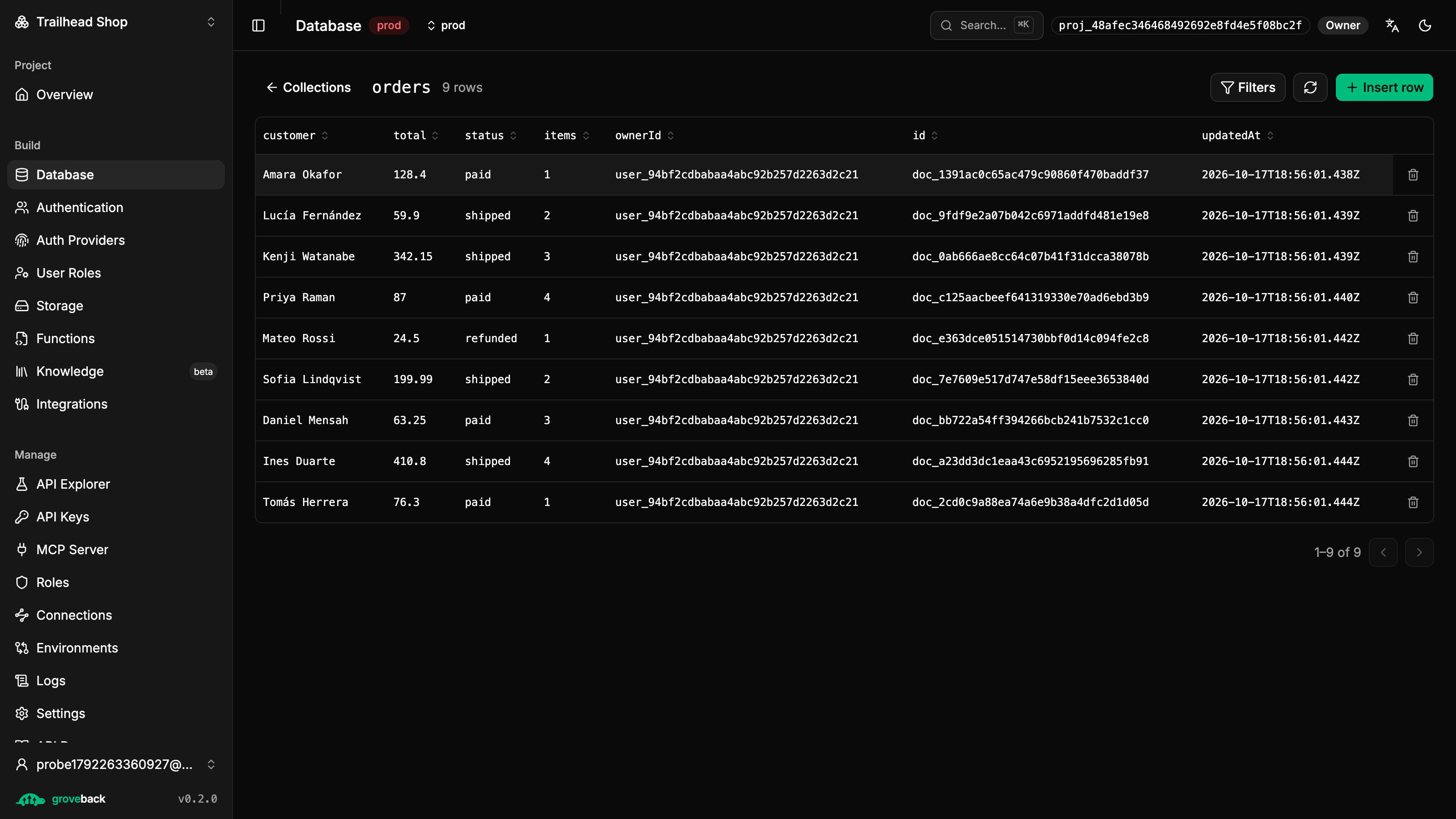
AI first
Groveback was designed to be driven by an agent from the first commit. Every admin operation in the API is a tool your agent can call, with the same permissions and the same audit trail.
114 MCP tools
Collections, policies, functions, storage, users, roles, RAG and webhooks. One API key, one command to connect.
Safe by design
The key is scoped to one project, the data plane stays closed until a policy opens it, and read only mode skips every tool that writes.
It checks its own work
Function tests, integration tests and knowledge base evals run as tools, so the agent proves a change before you ship it.
Config as code
grove pull writes the whole project into your repo; grove push --dry-run shows the diff before anything changes.
# Connect it once
$ claude mcp add groveback_shop -e GROVEBACK_URL=https://api.groveback.com -e GROVEBACK_API_KEY=gb_sk_… -- npx -y @groveback/mcp@latest
› Build an orders backend. Customers only see their own orders, and notify me on each new one.
✓ Done. orders is closed by default and each customer only reads their own; notify-on-order runs after every insert.
$ grove pull # the project lands in your repo as code
Your data stays in MongoDB. Everything around it is already built, and every request still passes your policies.
One project, six building blocks
01 · Auth
Email and password, OAuth providers, TOTP with backup codes, email verification and password reset. Your users live in your database.
const grove = createClient({ baseUrl, projectId: 'shop' });

await grove.auth.register('ada@shop.dev', 'hunter22', 'Ada');
const user = await grove.auth.login('ada@shop.dev', 'hunter22');
// MFA on? login resolves { mfaRequired: true }
await grove.auth.verifyMfa('481207');
02 · Data API
Every collection gets REST and GraphQL. Nothing is readable until you write a policy, and the policy becomes part of the Mongo query, so indexes still apply.
// policies/orders.json — $and'ed into every query
{
  "list":   { "filter": { "ownerId": "$auth.uid" } },
  "create": { "validate": "document.total > 0" },
  "update": { "immutableFields": ["ownerId"] }
}

const mine = await grove.collection('orders').find({ limit: 20 });
03 · Storage
Buckets, folders and signed links, on S3 compatible storage. Public or private per bucket.
await grove.storage.upload('avatars', 'ada.png', file, 'image/png');

const { url } = await grove.storage.signUrl('avatars', 'ada.png', 3600);
04 · Functions
Database triggers, cron jobs and custom HTTP endpoints. They run in an isolated worker with no secrets and reach your data only through the same policies.
// functions/normalize-email.ts — a pre hook, sandboxed
export default async (event, ctx) => {
  if (!event.document.email?.includes('@')) {
    return { abort: true, reason: 'email is invalid' };
  }
  return { document: { ...event.document, email: event.document.email.toLowerCase() } };
};
05 · Realtime
Subscribe to a collection and get inserts, updates and deletes as they happen. Each event is filtered by the subscriber’s read policy.
const orders = grove.collection('orders');

const stop = orders.subscribe('*', (event) => {
  console.log(event.type, event.document);
});
06 · Vector
Embed text on write and search by similarity, with the same filters and permissions as any other read. Knowledge bases for RAG come built in.
const hits = await grove.collection('products').search({
  text: 'waterproof hiking boots',
  limit: 8,
});
// ranked closest first, filtered by the same read policy
One project, six building blocks
01 · Auth
Email and password, OAuth providers, TOTP with backup codes, email verification and password reset. Your users live in your database.
02 · Data API
Every collection gets REST and GraphQL. Nothing is readable until you write a policy, and the policy becomes part of the Mongo query, so indexes still apply.
03 · Storage
Buckets, folders and signed links, on S3 compatible storage. Public or private per bucket.
04 · Functions
Database triggers, cron jobs and custom HTTP endpoints. They run in an isolated worker with no secrets and reach your data only through the same policies.
05 · Realtime
Subscribe to a collection and get inserts, updates and deletes as they happen. Each event is filtered by the subscriber’s read policy.
06 · Vector
Embed text on write and search by similarity, with the same filters and permissions as any other read. Knowledge bases for RAG come built in.
const grove = createClient({ baseUrl, projectId: 'shop' });

await grove.auth.register('ada@shop.dev', 'hunter22', 'Ada');
const user = await grove.auth.login('ada@shop.dev', 'hunter22');
// MFA on? login resolves { mfaRequired: true }
await grove.auth.verifyMfa('481207');// policies/orders.json — $and'ed into every query
{
"list": { "filter": { "ownerId": "$auth.uid" } },
"create": { "validate": "document.total > 0" },
"update": { "immutableFields": ["ownerId"] }
}
const mine = await grove.collection('orders').find({ limit: 20 });await grove.storage.upload('avatars', 'ada.png', file, 'image/png');
const { url } = await grove.storage.signUrl('avatars', 'ada.png', 3600);// functions/normalize-email.ts — a pre hook, sandboxed
export default async (event, ctx) => {
if (!event.document.email?.includes('@')) {
return { abort: true, reason: 'email is invalid' };
}
return { document: { ...event.document, email: event.document.email.toLowerCase() } };
};const orders = grove.collection('orders');
const stop = orders.subscribe('*', (event) => {
console.log(event.type, event.document);
});const hits = await grove.collection('products').search({
text: 'waterproof hiking boots',
limit: 8,
});
// ranked closest first, filtered by the same read policyWatch it work
From an empty project to an agent building the backend. The videos are in Spanish.
AI designs your backend: an online store in a minute
Tutorial 2 · 0:54
 0:37Tutorial 1Your first backend in 30 seconds
 0:54Tutorial 2AIAI designs your backend: an online store in a minute
 0:34Tutorial 3Collections and schemas: a database with an API, instantly
 0:27Tutorial 4Access policies: secure by default
 0:27Tutorial 5User auth: login, providers and roles
 0:20Tutorial 6File storage: buckets, uploads and signed URLs
 0:30Tutorial 7Functions and endpoints: your own logic, no servers
 0:27Tutorial 8API keys and the explorer: connect your server and try your API
 0:21Tutorial 9AIThe MCP server: build your backend from Claude, Codex or Cursor
9 videos · about 5 minutes
How it works
In the dashboard, or locally with one command. Each project gets its own database.
Define collections with a JSON schema and write a policy per operation. Preview what a user would see before you ship.
Use the SDK, REST or GraphQL. Generate a typed client from your schema with grove gen.
Built for teams that ship
Point a project at your Atlas cluster. System data stays apart from yours.
Dev and production per project, with config you can promote between them.
The whole backend in memory for development, with seed data that persists.
grove dev, seed, pull, push and gen: everything an agent needs to run locally and ship config.
Scoped keys for servers, member roles for your team, end user roles for your app.
Export the whole project as a bundle you commit, and import it anywhere.
Yes, that is the plan. We will publish the code once we are sure it runs well, is secure and is ready for the community to build on. Until then you can start on the free plan or run it locally with the CLI.
No. Projects run on our cluster by default. You can link your own cluster when you create a project, and environments can share it under a different database.
One project with two environments, 512 MB of storage, 100,000 function runs a month and 10,000 vectors. No credit card.
Every collection is closed until it has a policy. A policy is a Mongo filter plus optional CEL validation per operation, added to every query on the server.
Almost everything you can do in the dashboard. The MCP server has 114 tools: collections, schemas, policies, functions with tests and rollback, storage, users, roles, knowledge bases and webhooks. Start it in read only mode if you only want the agent to look.
Yes. The CLI starts the whole backend in memory with a dashboard link, no account or config file needed.
Start on the free plan, connect your agent, or run it locally right now.
Or run it locally, no account needed
npx -y @groveback/cli@latest dev --seed --persist